- 1.站点名称
- 2.站点网址
- 3.完整路径标题如分享几个Typecho中常用的调用函数
- 4.站点说明
- 5.模板文件夹地址
- 6.导入模板文件夹内的php文件
- 7.文章或者页面的作者
- 8.作者头像
- 9.该文作者全部文章列表链接
- 10.该文作者个人主页链接
- 11.该文作者的邮箱地址
- 12.上一篇与下一篇调用代码
- 13.判断是否为首页,输出相关内容
- 14.文章或页面,评论数目
- 15.截取部份文章(首页每篇文章显示摘要),350是字数
- 16.调用自定义字段(官方文档坑爹,竟然没有,博主自己摸索出来的)
- 17.RSS地址
- 18.获取最新post
- 19.纯文字分类名称,不带链接
- 20.获取文章分类列表
- 21.获取某分类post
- 22.获取最新评论列表
- 23.首页获取 最新文章 代码限制条数
- 24.获取最新评论列表第二个版本,只显示访客评论不显示博主也就是作者或者说自己发的评论
- 25.获取文章时间归档
- 26.获取标签集合,也就是标签云
- 27.调用该文相关文章列表
- 28.隐藏head区域的程序版本和模版名称
- 29.获取读者墙
- 30.登陆与未登录用户展示不同内容
- 31.导航页面列表调用隐藏特定的页面 这个演示隐藏了album和search两个页面
- 32.Typecho归档页面
- 33.获取当前文章页缩略图
- 34.根据页面类型显示内容
- 35.在线人数
- 36.前台访客总数
- 37.获取当前页面加载完成速度时间
- 38.已运行时间
- 39.判断最新帖子并显示图标
- 40.前台总访客数
- 41.添加文章阅读数
- 42.显示摘要
- 43.添加编辑按钮 post.php
- 44.调用时间格式年月日时分
- 45.调用分类
- 46.子目录部署
- 47.回复查看全文
- 48.更换域名
- 49.添加目录树
- 50.添加字数统计和阅读时间
- 51.自定义字段
- 52.Typecho常见目录文件说明

1.站点名称
<?php $this->options->title() ?>
2.站点网址
<?php $this->options ->siteUrl(); ?>
3.完整路径标题如分享几个Typecho中常用的调用函数
<?php $this->archiveTitle(' » ', < span class="string">'', ' | '); ?><?php $this ->options->title(); ?>
4.站点说明
<?php $this->options->description() ?>
5.模板文件夹地址
<?php $this->options->themeUrl(); ?>
6.导入模板文件夹内的php文件
<?php $this->need('.php'); ?>
7.文章或者页面的作者
<?php $this->author(); ?>
8.作者头像
< ?php $this->author->gravatar('40') ?>
此处输出的完整的img标签,40是头像的宽和高。
9.该文作者全部文章列表链接
<?php $this->author->permalink (); ?>
10.该文作者个人主页链接
<?php $this->author->url(); ?>
11.该文作者的邮箱地址
<?php $this->author->mail(); ?>
12.上一篇与下一篇调用代码
<?php $this->thePrev(); ?> <?php $this->theNext(); ?>
13.判断是否为首页,输出相关内容
<?php if ($this->is('index')): ?>
//首页输出内容
<?php else: ?>
//不是首页输出内容
<?php endif; ?>
14.文章或页面,评论数目
<?php $this->commentsNum('No Comments', '1 Comment' , '%d Comments'); ?>
15.截取部份文章(首页每篇文章显示摘要),350是字数
<?php $this->excerpt(350, '...'); ?>
16.调用自定义字段(官方文档坑爹,竟然没有,博主自己摸索出来的)
<?php $this->fields->fieldName ?>
17.RSS地址
<?php$this->options->feedUrl(); ?>
18.获取最新post
<?php $this->widget('Widget_Contents_Post_Recent', 'pageSize=8&type=category')->parse('<li><a href="{permalink}">{title}</a></li>'); ?>
19.纯文字分类名称,不带链接
<?php $this->category(',', false); ?>
20.获取文章分类列表
<ul>
<?php $this->widget('Widget_Metas_Category_List')
        ->parse('<li><a href="{permalink}">{name}</a> ({count})</li>'); ?>

</ul>
21.获取某分类post
<ul>
<?php
$this->widget('Widget_Archive@indexyc', 'pageSize=8&type=category', 'mid=1')
->parse('<li><a href="{permalink}" title="{title}">{title}</a></li>'); ?>
</ul>
22.获取最新评论列表
<ul>
<?php $this->widget('Widget_Comments_Recent')->to($comments); ?>
<?php while($comments->next()): ?>
<li><a href="<?php $comments->permalink(); ?>"><?php $comments->author(false); ?></a>: <?php
$comments->excerpt(50, '...'); ?></li>
<?php endwhile; ?>

</ul>
23.首页获取 最新文章 代码限制条数
<?php while ($this->next()): ?>
<?php if ($this->sequence <= 3): ?>
html
<?php endif; ?>
<?php endwhile; ?>
24.获取最新评论列表第二个版本,只显示访客评论不显示博主也就是作者或者说自己发的评论
<?php $this->widget('Widget_Comments_Recent','ignoreAuthor=true')->to($comments); ?>
<?php while($comments->next()): ?>
<li><a href="<?php $comments->permalink(); ?>"><?php $comments->author(false); ?></a>: <?php
$comments->excerpt(50, '...'); ?></li>
<?php endwhile; ?>
25.获取文章时间归档
<ul>
<?php $this->widget('Widget_Contents_Post_Date', 'type=month&format=F Y')
            ->parse('<li><a href="{permalink}">{date}</a></li>'); ?>
</ul>
26.获取标签集合,也就是标签云
<?php $this->widget('Widget_Metas_Tag_Cloud', 'ignoreZeroCount=1&limit=28')->to($tags); ?>
<?php while($tags->next()): ?>
<a href="<?php $tags->permalink(); ?>" class="size-<?php $tags->split(5, 10, 20, 30); ?>"><?php $tags->name(); ?></a>
<?php endwhile; ?>
27.调用该文相关文章列表
<?php $this->related(5)->to($relatedPosts); ?>
<?php if ($relatedPosts->have()): ?>    //这句也可以写成 if (count($relatedPosts->stack))
<?php while ($relatedPosts->next()): ?>
    <li><a href="<?php $relatedPosts->permalink(); ?>" title="<?php $relatedPosts->title(); ?>"><?php $relatedPosts->title(); ?></a></li>`
<?php endwhile; ?>
<?php else : ?>
    <li>无相关文章</li>
<?php endif; ?>
28.隐藏head区域的程序版本和模版名称
<?php $this->header("generator=&template="); ?>
29.获取读者墙
<?php
$period = time() - 999592000; // 時段: 30 天, 單位: 秒
$counts = Typecho_Db::get()->fetchAll(Typecho_Db::get()
->select('COUNT(author) AS cnt','author', 'url', 'mail')
->from('table.comments')
->where('created > ?', $period )
->where('status = ?', 'approved')
->where('type = ?', 'comment')
->where('authorId = ?', '0')
->group('author')
->order('cnt', Typecho_Db::SORT_DESC)
->limit(25)
);
$mostactive = '';
$avatar_path = 'http://www.gravatar.com/avatar/';
foreach ($counts as $count) {
$avatar = $avatar_path . md5(strtolower($count['mail'])) . '.jpg';
$c_url = $count['url']; if ( !$c_url ) $c_url = Helper::options()->siteUrl;
$mostactive .= "<a href='" . $c_url . "' title='" . $count['author'] . " (参与" . $count['cnt'] . "次互动)' target='_blank'><img src='" . $avatar . "' alt='" . $count['author'] . "的头像' class='avatar' width='32' height='32' /></a>\n";
}
 echo $mostactive; ?>
30.登陆与未登录用户展示不同内容
<?php if($this->user->hasLogin()): ?>
// 登陆可见
<?php else: ?>
// 未登录和登陆均可见
<?php endif; ?>
31.导航页面列表调用隐藏特定的页面 这个演示隐藏了album和search两个页面
<ul>
<li<?php if($this->is('index')): ?> class="current"<?php endif; ?>><a href="<?php $this->options->siteUrl(); ?>">主页</a></li>
<?php $this->widget('Widget_Contents_Page_List')->to($pages); ?>
    <?php while($pages->next()): ?>
    <?php if (($pages->slug != 'album') && ($pages->slug != 'search')): ?>
    <li<?php if($this->is('page', $pages->slug)): ?> class="current"<?php endif; ?>><a href="<?php $pages->permalink(); ?>" title="<?php $pages->title(); ?>"><?php $pages->title(); ?></a></li>
    <?php endif; ?>
    <?php endwhile; ?>
</ul>
32.Typecho归档页面
<?php $this->widget('Widget_Contents_Post_Recent', 'pageSize=10000')->to($archives);
    $year=0; $mon=0; $i=0; $j=0;
    $output = '<div id="archives">';
    while($archives->next()):
        $year_tmp = date('Y',$archives->created);
        $mon_tmp = date('m',$archives->created);
        $y=$year; $m=$mon;
        if ($mon != $mon_tmp && $mon > 0) $output .= '</ul></li>';
        if ($year != $year_tmp && $year > 0) $output .= '</ul>';
        if ($year != $year_tmp) {
            $year = $year_tmp;
            $output .= '<h3 class="al_year">'. $year .' 年</h3><ul class="al_mon_list">'; //输出年份
        }
        if ($mon != $mon_tmp) {
            $mon = $mon_tmp;
            $output .= '<li><span class="al_mon">'. $mon .' 月</span><ul class="al_post_list">'; //输出月份
        }
        $output .= '<li>'.date('d日: ',$archives->created).'<a href="'.$archives->permalink .'">'. $archives->title .'</a> <em>('. $archives->commentsNum.')</em></li>'; //输出文章日期和标题
    endwhile;
    $output .= '</ul></li></ul></div>';
    echo $output;
?>
33.获取当前文章页缩略图
<?php $this->attachments(1)->attachment->url(); ?>
进行熊掌号改造的朋友请务必注意,这里所谓缩略图指的是当前文章页第一个附件地址,请确保第一个附件类型为图片。
34.根据页面类型显示内容
1.判断是文章页则显示内容:
<?php if ($this->is('post')): ?>
想要显示的内容1
<?php endif; ?>
2.判断是页面则显示内容:
<?php if ($this->is('page', 'about')): ?>
想要显示的内容2
<?php endif; ?>
35.在线人数
functions.php
//在线人数
function online_users() {
    $filename='online.txt'; //数据文件
    $cookiename='Nanlon_OnLineCount'; //Cookie名称
    $onlinetime=30; //在线有效时间
    $online=file($filename);
    $nowtime=$_SERVER['REQUEST_TIME'];
    $nowonline=array();
    foreach($online as $line){
        $row=explode('|',$line);
    $sesstime=trim($row[1]);
    if(($nowtime - $sesstime)<=$onlinetime){
        $nowonline[$row[0]]=$sesstime;
    }
}
if(isset($_COOKIE[$cookiename])){
    $uid=$_COOKIE[$cookiename];
}else{
    $vid=0;
    do{
        $vid++;
        $uid='U'.$vid;
    }while(array_key_exists($uid,$nowonline));
    setcookie($cookiename,$uid);
}
$nowonline[$uid]=$nowtime;
$total_online=count($nowonline);
if($fp=@fopen($filename,'w')){
    if(flock($fp,LOCK_EX)){
        rewind($fp);
        foreach($nowonline as $fuid=>$ftime){
            $fline=$fuid.'|'.$ftime."\n";
            @fputs($fp,$fline);
        }
        flock($fp,LOCK_UN);
        fclose($fp);
    }
}
echo "$total_online";
}
在需要的地方调用
<li class="list-group-item"> <i class="glyphicon glyphicon-user text-muted text-muted"></i> <span class="badge pull-right"><?php echo online_users() ?></span><?php _me("在线人数") ?></li>
36.前台访客总数
functions.php
//总访问量
function theAllViews()
{
    $db = Typecho_Db::get();
    $row = $db->fetchAll('SELECT SUM(VIEWS) FROM `typecho_contents`');
    echo number_format($row[0]['SUM(VIEWS)']);
}
在需要的地方调用
<li class="list-group-item text-second"><span class="blog-info-icons"> <i data-feather="user"></i></span><span class="badge pull-right"><?php echo theAllViews();?></span><?php _me("总访客数") ?></li>
37.获取当前页面加载完成速度时间
函数 functions.php
function timer_start() {
    global $timestart;
    $mtime     = explode( ' ', microtime() );
    $timestart = $mtime[1] + $mtime[0];
    return true;
}
timer_start();
function timer_stop( $display = 0, $precision = 3 ) {
    global $timestart, $timeend;
    $mtime     = explode( ' ', microtime() );
    $timeend   = $mtime[1] + $mtime[0];
    $timetotal = number_format( $timeend - $timestart, $precision );
    $r         = $timetotal < 1 ? $timetotal * 1000 . " ms" : $timetotal . " s";
    if ( $display ) {
        echo $r;
    }
    return $r;
}
调用
<?php echo timer_stop();?>
38.已运行时间
函数 functions.php
// 设置时区
date_default_timezone_set('Asia/Shanghai');
/**
 * 秒转时间,格式 年 月 日 时 分 秒
 *
 */
function getBuildTime() {
    // 在下面按格式输入本站创建的时间
    $site_create_time = strtotime('2019-06-23 00:00:00');
    $time = time() - $site_create_time;
    if (is_numeric($time)) {
        $value = array(
            "years" => 0, "days" => 0, "hours" => 0,
            "minutes" => 0, "seconds" => 0,
        );
        if ($time >= 31556926) {
            $value["years"] = floor($time / 31556926);
            $time = ($time % 31556926);
        }
        if ($time >= 86400) {
            $value["days"] = floor($time / 86400);
            $time = ($time % 86400);
        }
        if ($time >= 3600) {
            $value["hours"] = floor($time / 3600);
            $time = ($time % 3600);
        }
        if ($time >= 60) {
            $value["minutes"] = floor($time / 60);
            $time = ($time % 60);
        }
        $value["seconds"] = floor($time);

        echo ''.$value['years'].
        '年'.$value['days'].
        '天'.$value['hours'].
        '小时'.$value['minutes'].
        '分';
    } else {
        echo '';
    }
}
调用1
<?php getBuildTime(); ?>
调用2
本站已安全运行:


function show_date_time(){
window.setTimeout("show_date_time()", 1000);
BirthDay=new Date("05-06-2016 12:12:24");//建站日期
today=new Date();
timeold=(today.getTime()-BirthDay.getTime());
sectimeold=timeold/1000
secondsold=Math.floor(sectimeold);
msPerDay=24*60*60*1000
e_daysold=timeold/msPerDay
daysold=Math.floor(e_daysold);
e_hrsold=(daysold-e_daysold)*-24;
hrsold=Math.floor(e_hrsold);
e_minsold=(hrsold-e_hrsold)*-60;
minsold=Math.floor((hrsold-e_hrsold)*-60);
seconds=Math.floor((minsold-e_minsold)*-60);
momk.innerHTML=daysold+"天"+hrsold+"小时"+minsold+"分"+seconds+"秒" ;
}
show_date_time();


#momk{animation:change 10s infinite;font-weight:800; }
@keyframes change{0%{color:#5cb85c;}25%{color:#556bd8;}50%{color:#e40707;}75%{color:#66e616;}100% {color:#67bd31;}}
调用3
function NewDate(str) {
str = str.split('-');
var date = new Date();
date.setUTCFullYear(str[0], str[1] - 1, str[2]);
date.setUTCHours(0, 0, 0, 0);
return date;
}
function momxc() {
var birthDay =NewDate("2016-5-6");
var today=new Date();
var timeold=today.getTime()-birthDay.getTime();
var sectimeold=timeold/1000
var secondsold=Math.floor(sectimeold);
var msPerDay=24*60*60*1000; var e_daysold=timeold/msPerDay;
var daysold=Math.floor(e_daysold);
var e_hrsold=(daysold-e_daysold)*-24;
var hrsold=Math.floor(e_hrsold);
var e_minsold=(hrsold-e_hrsold)*-60;
var minsold=Math.floor((hrsold-e_hrsold)*-60); var seconds=Math.floor((minsold-e_minsold)*-60).toString();
document.getElementById("momk").innerHTML = "本站已安全运行"+daysold+"天"+hrsold+"小时"+minsold+"分"+seconds+"秒";
setTimeout(momxc, 1000);
}momxc();

#momk{animation:change 10s infinite;font-weight:800; }
@keyframes change{0%{color:#5cb85c;}25%{color:#556bd8;}50%{color:#e40707;}75%{color:#66e616;}100% {color:#67bd31;}}
39.判断最新帖子并显示图标
函数 functions.php
/**
* 判断时间区间
*
* 使用方法  if(timeZone($this->date->timeStamp)) echo 'ok';
*/
function timeZone($from){
$now = new Typecho_Date(Typecho_Date::gmtTime());
return $now->timeStamp - $from < 24*60*60 ? true : false;
}
调用 index.php
<?php if(timeZone($this->date->timeStamp)) echo ' new'; ?>
40.前台总访客数
函数 functions.php
//总访问量
function theAllViews()
    {
        $db = Typecho_Db::get();
        $row = $db->fetchAll('SELECT SUM(VIEWS) FROM `typecho_contents`');
            echo number_format($row[0]['SUM(VIEWS)']);
    }
前台调用
<?php echo theAllViews();?><?php _me("访客总数") ?>
41.添加文章阅读数
函数 functions.php
function Postviews($archive) {
    $db = Typecho_Db::get();
    $cid = $archive->cid;
    if (!array_key_exists('views', $db->fetchRow($db->select()->from('table.contents')))) {
        $db->query('ALTER TABLE `'.$db->getPrefix().'contents` ADD `views` INT(10) DEFAULT 0;');
    }
    $exist = $db->fetchRow($db->select('views')->from('table.contents')->where('cid = ?', $cid))['views'];
    if ($archive->is('single')) {
        $cookie = Typecho_Cookie::get('contents_views');
        $cookie = $cookie ? explode(',', $cookie) : array();
        if (!in_array($cid, $cookie)) {
            $db->query($db->update('table.contents')
                ->rows(array('views' => (int)$exist+1))
                ->where('cid = ?', $cid));
            $exist = (int)$exist+1;
            array_push($cookie, $cid);
            $cookie = implode(',', $cookie);
            Typecho_Cookie::set('contents_views', $cookie);
        }
    }
    echo $exist == 0 ? '   暂无👀阅读' :'   👁阅读量:' .$exist;
}
调用
<?php Postviews($this); ?>
42.显示摘要
A.使用 <!--more-->
<!--more-->
B.修改index.php
主题的 index.php 文件中找到<?php $this->content('阅读剩余部分...'); ?>
替换为<?php $this->excerpt(); ?>
或者<?php $this->excerpt(100, '...'); ?>
C.编辑文件
登录到后台-控制台-外观-编辑当前外观:
编辑文件 archive.php
编辑文件 index.php
修改两处分别找到:
/ 默认显示的是全文 /<?php $this->content('- 阅读剩余部分 -'); ?>
替换成(概要取300字):
/ 自定义输出,如 300个字符 /
<?php $this->excerpt(300,'- 阅读剩余部分 -'); ?>
修改typecho首页显示文章的数量:
编辑文件 functions.php
在末尾添加:
/* 自定义首页文章分布数量,如 10 */
function themeInit($archive) {
if ($archive->is('index')) {
$archive->parameter->pageSize = 10;
}
}
43.添加编辑按钮 post.php
<?php if($this->user->hasLogin()):?>
    <a href="<?php $this->options->adminUrl(); ?>write-post.php?cid=<?php echo $this->cid;?>" target="_blank">编辑</a>
<?php endif;?>
44.调用时间格式年月日时分
<time datetime ="<?php $this->date('c'); ?>" itemprop="datePublished"> <?php $this->date('Y-m-d H:i'); ?></time></a>45.调用分类
分类:<?php $this->category(' - '); ?>
46.子目录部署
location /子目录文件夹路径名/ {
    if (!-e $request_filename) {
        rewrite ^(.*)$ /子目录文件夹路径名/index.php$1 last;
    }
}
47.回复查看全文
第一步
修改post.php文件
找到content(); ?>
<?php $this->content(); ?>
替换为
<?php echo parse_content($this->content,$this->cid,$this->remember('mail',true),$this->user->hasLogin()); ?>
第二步
在函数 functions.php 文件
在最后位置添加一下代码:
/**
* 回复可见所需功能代码*
* @access public
* @param string $content 文章内容
* @return string
*/
function parse_content($content,$cid,$mail,$login){
    $db = Typecho_Db::get();
    $sql = $db->select()->from('table.comments')
    ->where('cid = ?',$cid)
    ->where('mail = ?', $mail)
    ->where('status = ?', 'approved')
    ->limit(1);
    $result = $db->fetchAll($sql);
    if($login || $result) {
        $content = preg_replace("/\[hide\](.*?)\[\/hide\]/sm",'<div class="reply2view">$1</div>',$content);
    }
    else{
        $content = preg_replace("/\[hide\](.*?)\[\/hide\]/sm",'<div class="reply2view">此处内容回复可见,请先<a href="#respond-post-'. $cid .'">回复</a>。</div>',$content);
    }
    return $content;
}
Typecho_Plugin::factory('Widget_Abstract_Contents')->excerptEx = array('moleft','one');
Typecho_Plugin::factory('Widget_Abstract_Contents')->contentEx = array('moleft','one');
class moleft {
    public static function one($con,$obj,$text)
    {
      $text = empty($text)?$con:$text;
      if(!$obj->is('single')){
      $text = preg_replace("/\[hide\](.*?)\[\/hide\]/sm",'',$text);
      }
      return $text;
    }
}
第三步
添加样式
在样式表:style.css在最后面添加以下代码:
<!-- 在head标签中添加回复可见的样式 -->
<style>
.reply2view {
    background-color:rgb(255,255,255,0.3);
    border-radius:5px;
    border:1px dashed #888888;
    padding:10px 10px 10px 40px;
    position:relative;
}
</style>
使用方法
用 hide 将需要隐藏的内容包裹起来即可 记得加上[ ]
48.更换域名
修改数据库
- 1.
typecho_options修改siteUrl链接 如果失败 就手动修改
UPDATE `typecho_options` SET `value` = '新域名' WHERE `typecho_options`.`name` = 'siteUrl' AND `typecho_options`.`user` =0;- 2.修改文章中相关域名:位置typecho_contents表
UPDATE `typecho_contents` SET `text` = REPLACE(`text`,'旧域名','新域名');- 3.修改管理员个人网站:位置typecho_users表
UPDATE `typecho_users` SET `url` = REPLACE(`url`,'旧域名','新域名');- 4.修改评论中相关域名:位置typecho_comments 表
UPDATE `typecho_comments` SET `url` = REPLACE(`url`,'旧域名','新域名');
UPDATE `typecho_comments` SET `text` = REPLACE(`text`,'旧域名','新域名');
UPDATE `typecho_comments` SET `mail` = REPLACE(`mail`,'旧域名','新域名');
使用插件
快速方便的插件https://github.com/jrotty/TEReplace
网盘:https://www.123pan.com/s/YscKVv-MbwVv.html
- 插件功能支持:
- 1,支持替换文章内容与标题
- 2,支持替换独立页面内容与标题
- 3,支持替换评论内容
- 4,支持替换评论的网址
- 5,支持替换fm字段内容(适用于Violet主题以及其他主题)
- 6,支持替换thumb字段内容(适用于影视一号/2号主题以及大量其他主题)
- 7,支持替换MP4字段内容(适用于影视一号/2号主题和Violet主题)
49.添加目录树
functions.php内添加
function createCatalog($obj) {
    global $catalog;
    global $catalog_count;
    $catalog = array();
    $catalog_count = 0;
    $obj = preg_replace_callback('/<h([1-6])(.*?)>(.*?)<\/h\1>/i', function($obj) {
        global $catalog;
        global $catalog_count;
        $catalog_count ++;
        $catalog[] = array('text' => trim(strip_tags($obj[3])), 'depth' => $obj[1], 'count' => $catalog_count);
        return '<h'.$obj[1].$obj[2].'><a name="cl-'.$catalog_count.'"></a>'.$obj[3].'</h'.$obj[1].'>';
    }, $obj);
    return $obj;
}
function getCatalog() {
    global $catalog;
    $index = '';
    if ($catalog) {
        $index = '<ul>'."\n";
        $prev_depth = '';
        $to_depth = 0;
        foreach($catalog as $catalog_item) {
            $catalog_depth = $catalog_item['depth'];
            if ($prev_depth) {
                if ($catalog_depth == $prev_depth) {
                    $index .= '</li>'."\n";
                } elseif ($catalog_depth > $prev_depth) {
                    $to_depth++;
                    $index .= '<ul>'."\n";
                } else {
                    $to_depth2 = ($to_depth > ($prev_depth - $catalog_depth)) ? ($prev_depth - $catalog_depth) : $to_depth;
                    if ($to_depth2) {
                        for ($i=0; $i<$to_depth2; $i++) {
                            $index .= '</li>'."\n".'</ul>'."\n";
                            $to_depth--;
                        }
                    }
                    $index .= '</li>';
                }
            }
            $index .= '<li><a href="#cl-'.$catalog_item['count'].'">'.$catalog_item['text'].'</a>';
            $prev_depth = $catalog_item['depth'];
        }
        for ($i=0; $i<=$to_depth; $i++) {
            $index .= '</li>'."\n".'</ul>'."\n";
        }
    $index = '<div id="toc-container">'."\n".'<div id="toc">'."\n".'<strong>文章目录</strong>'."\n".$index.'</div>'."\n".'</div>'."\n";
    }
    echo $index;
}functions.php内搜索 function themeInit
如果没有themeInit函数
则在functions.php最后添加
function themeInit($archive) {
    if ($archive->is('single')) {
        $archive->content = createCatalog($archive->content);
    }
}如果有themeInit函数
则在themeInit内添加
if ($archive->is('single')) {
    $archive->content = createCatalog($archive->content);
}
50.添加字数统计和阅读时间
主题的functions.php文件,添加以下代码:
/**
 * 字数统计和阅读时间
 */
function art_count ($cid){
    $db = Typecho_Db::get ();
    $rs = $db->fetchRow ($db->select ('table.contents.text')->from ('table.contents')->where ('table.contents.cid=?',$cid)->order ('table.contents.cid',Typecho_Db::SORT_ASC)->limit (1));
    $text = preg_replace("/[^\x{4e00}-\x{9fa5}]/u", "", $rs['text']);
    $text_num = mb_strlen($text,'UTF-8');
    $read_time = ceil($text_num/400);
    $output = '字数' . $text_num . '   预计阅读耗时' . $read_time  . '分钟。';
    return $output;
}
在需要引用的地方插入
一般在文章页post的时间或作者或编辑等按钮附近并排插入
<?php _e(art_count($this->cid)); ?>
51.自定义字段
描述、关键词、标题、链接、图片等
themeFields函数
主题的functions.php文件,添加以下代码:
function themeFields($layout) {
    $keywords = new Typecho_Widget_Helper_Form_Element_Text('keywords', NULL, NULL, _t('文章keywords关键词'), _t('SEO设置'));
    $description = new Typecho_Widget_Helper_Form_Element_Text('description', NULL, NULL, _t('文章description描述'), _t('SEO设置'));
    $thumb = new Typecho_Widget_Helper_Form_Element_Text('thumb', NULL, NULL, _t('文章thumb图片'), _t('SEO设置'));
    $layout->addItem($keywords);
    $layout->addItem($description);
    $layout->addItem($thumb);
}
下载按钮
编辑器“自定义字段”写入Download,
类型选字符,
输入框填写下载链接
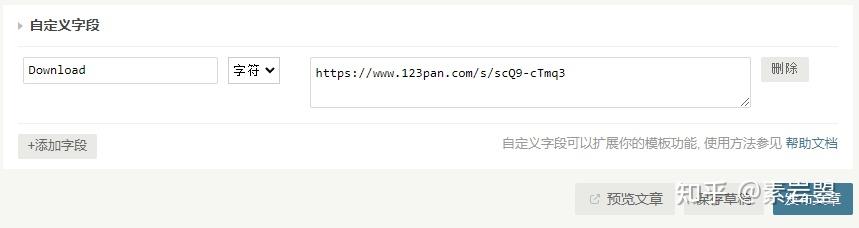
在post.php或需要的页面调用
<?php $this->fields->Download(); ?>,
如: <center><a href="/go.php?url=<?php $this->fields->Download(); ?>" target="_blank">下载</a></center>
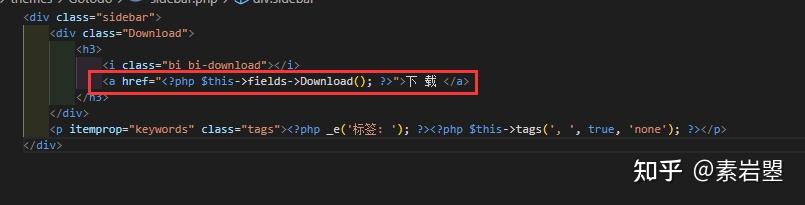
或者嫌每次手动输入字段麻烦
可以直接在functions.php中加入
/**
 * 设置下载链接自定义字段
 */
function themeFields($layout) {
    $Download = new Typecho_Widget_Helper_Form_Element_Text('Download', NULL, NULL, _t('下载链接'), _t('输入下载链接)'));
    $layout->addItem($Download);
}
52.Typecho常见目录文件说明
样式表
`style.css`
首页等
`index.php`
分类 整合 等
`archive.php`
头部
`header.php`
函数
`functions.php`
页脚
`footer.php`
独立页面
`page.php`
文章输出
`post.php`
侧栏
`sidebar.php`
评论
`comments.php`
作者
`author.php`
搜索
`search.php`
标签
`tag.php`
404错误
`404.php`
友链
`links.php`